Switchboard app icon

Every Mac utility you run, in one app, and the parts none of them have

Hotkey macros, gestures and key remaps, a launcher, snippets, clipboard history, folder rules and a selection bar, in one app. It imports the libraries of 13 of them, so you can run your own automations in the 30-day trial before you pay anything.

Coming soon

Not out yet. When it is, the first 30 days are free with everything on, no card or account.

See what it imports

165 steps · 49 triggers · 43 conditions · 191 functions · imports from 13 apps · macOS 26 · $59 once or $12 a month

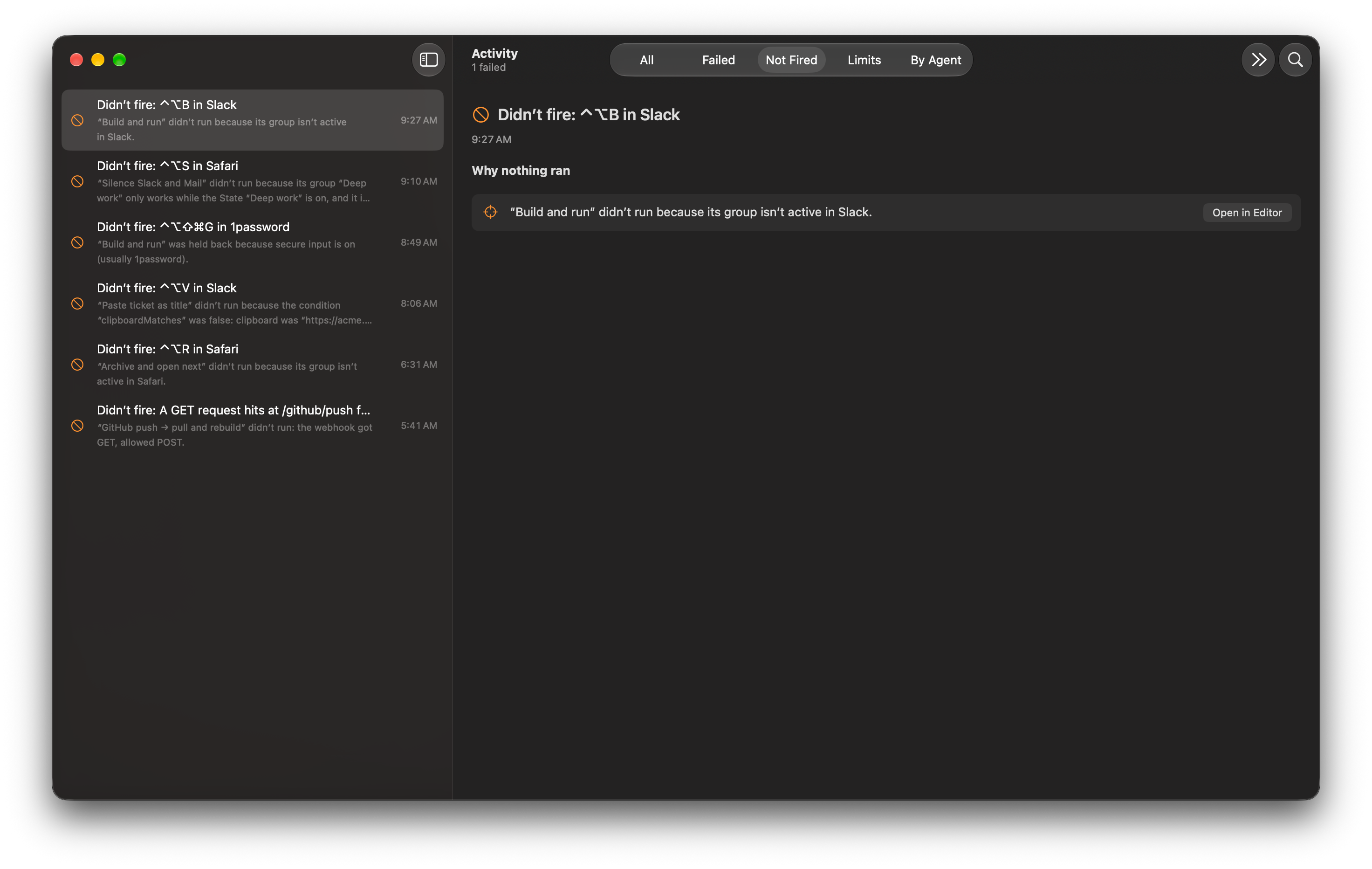
Activity › Not Fired listing the last hotkeys pressed and why each did not run

The utilities you’d otherwise install one at a time

Each of these is a normal macro you can open and change, so when one doesn’t do quite what you want, you fix it instead of writing to the developer.

Window snapping isn’t here. Raycast and Rectangle do it well and an extension can add it.

Every feature, with its page

Built for this macOS, not ported to it

Switchboard is a SwiftUI app written for macOS 26, with the Liquid Glass panels, the menu bar and the Shortcuts app that come with it. It is notarized by Apple, sold direct and updates itself.

A model runs only when you ask it to, and a badge shows when one ran and what it cost.

The parts you won’t have seen before

Each of these is an ordinary macro you can open and change. The screenshots are the app as it draws, light and dark.

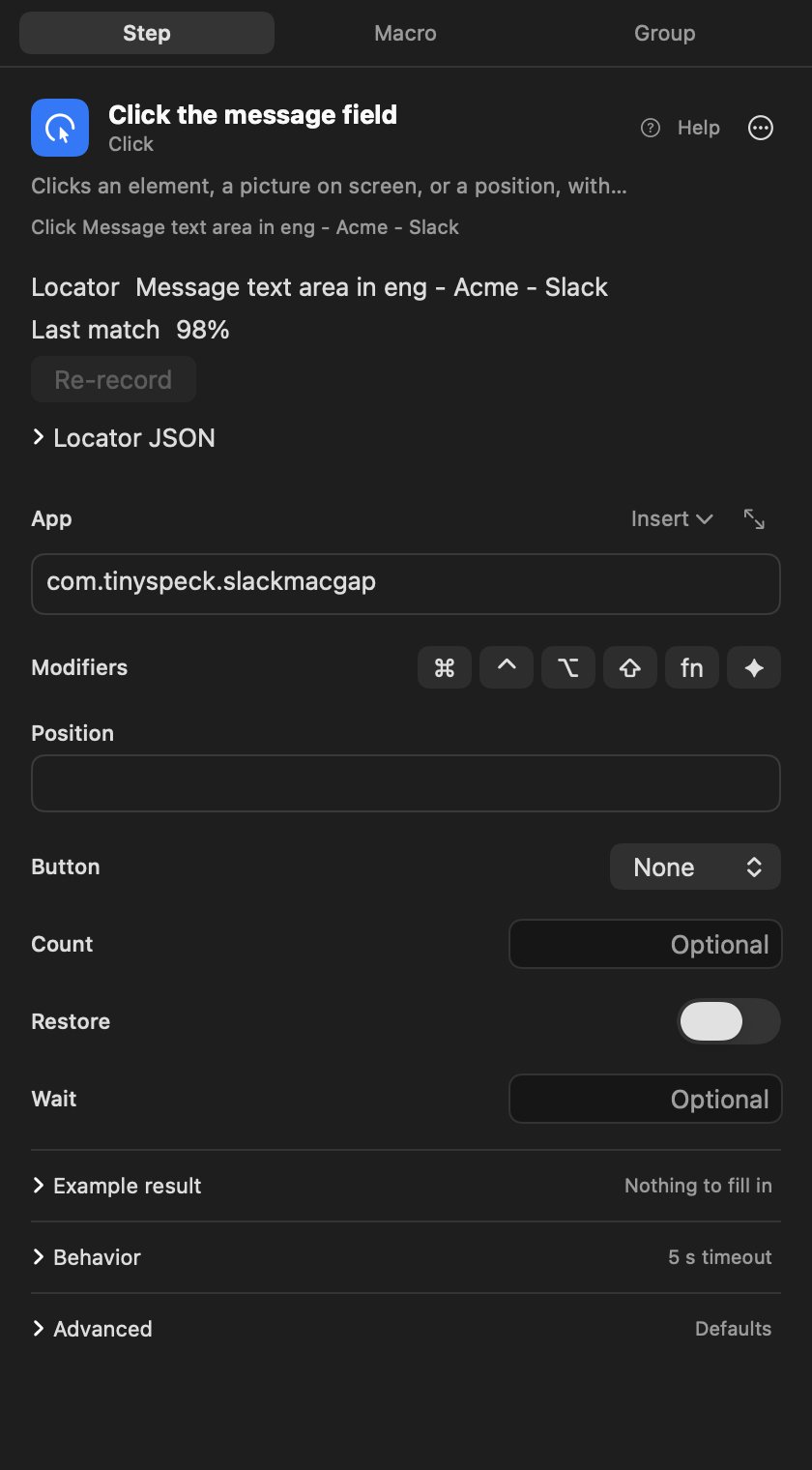
Recorded clicks find the button again.

When you record a click, Switchboard keeps the element itself: its role, its name and where it sits in the window. At run time it scores every candidate and clicks the best one, so Send is still Send after you move the window or change screens. An app that draws its own interface gives it less to go on, and then it reads the text in the window instead.
See how it works

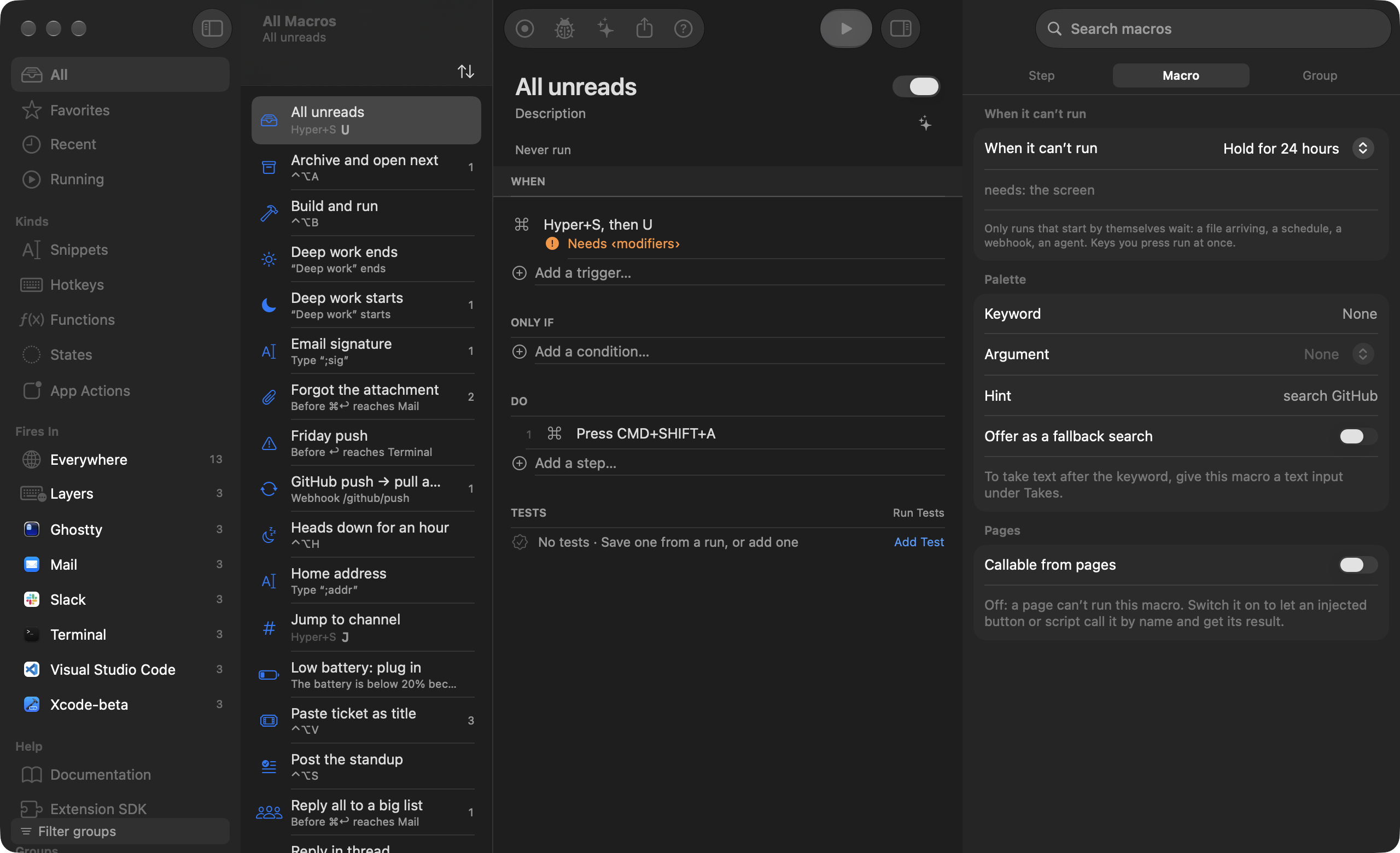
The inspector of a click step: the element’s role, name and place in the window, the match score and the alternatives

Click Message field in Slack · 98% match
Why the hotkey didn’t fire.

Every run leaves a trace, and so does every press that ran nothing. Activity › Not Fired lists the event and the reason: the group is off in this app, another macro had the key, a password field was holding secure input, or a condition came out false and here is what it saw. Secure input is a macOS thing, so the app can only guess which app switched it on.

See how it works

Activity › Not Fired listing the last hotkeys pressed and why each did not run

⌃⌥S in Slack · Scope: the group IDE is not active in Slack

Anything it can check, it can wait for.

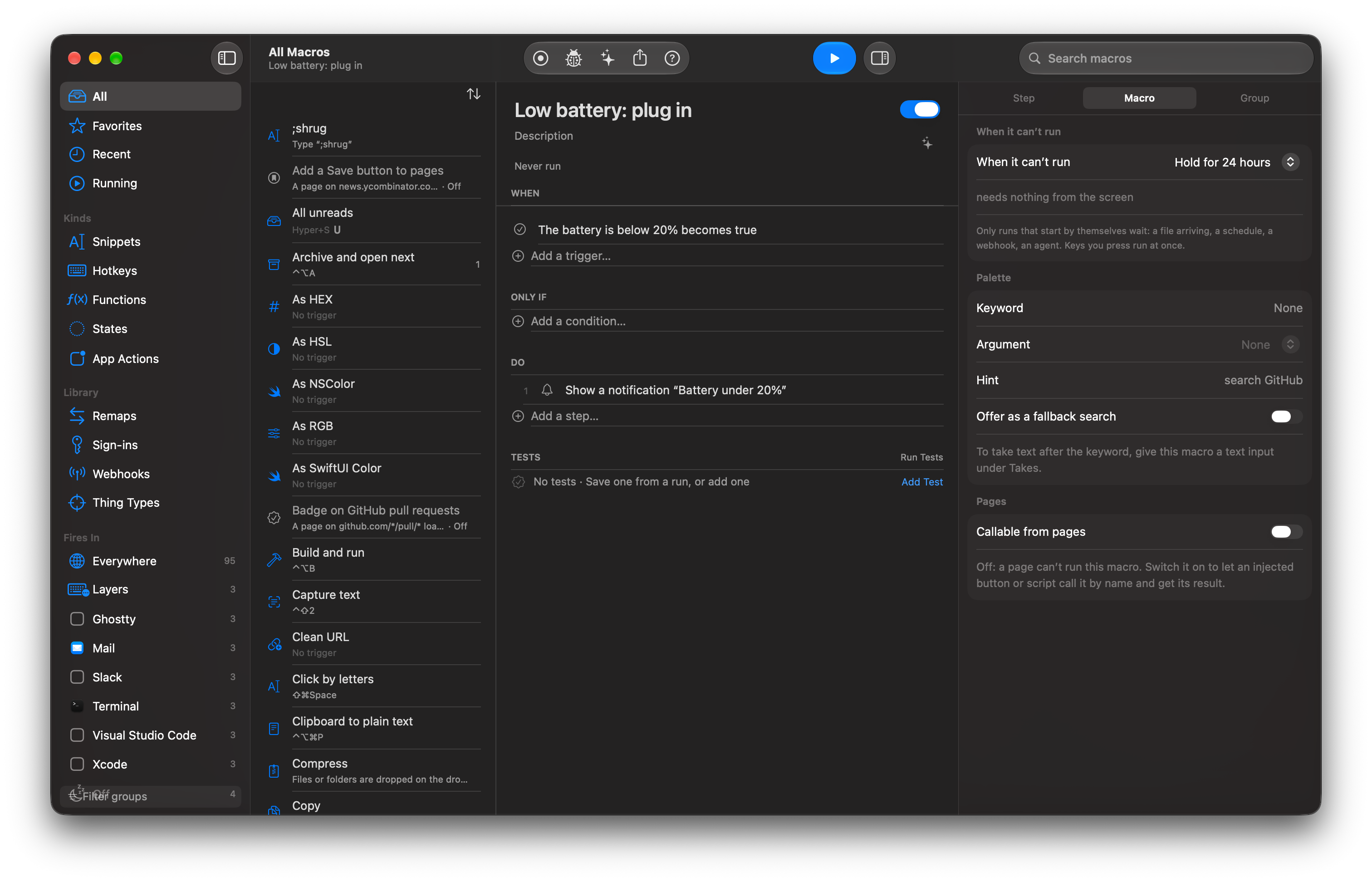
Battery under 20%, Zoom just quit, the network changed, a file landed: a condition is a trigger. Name a situation Deep work and whole groups of macros switch on and off with it.

See how it works

A macro whose When row is “battery drops below 20%”, named “Low battery: plug in”, open in the editor

Any web API or command-line tool is a step.

An app with Shortcuts actions is already in the step picker. Add an OpenAPI or GraphQL spec, or a CLI, once, and each query and subcommand gets a form like any other step. Linear issues and ffmpeg in the same macro. The key goes in your Keychain and never shows in a trace.

See how it works

The add-step chooser with Apps selected, listing actions from Linear, Things, Day and Fantastical

A macro is a text file.

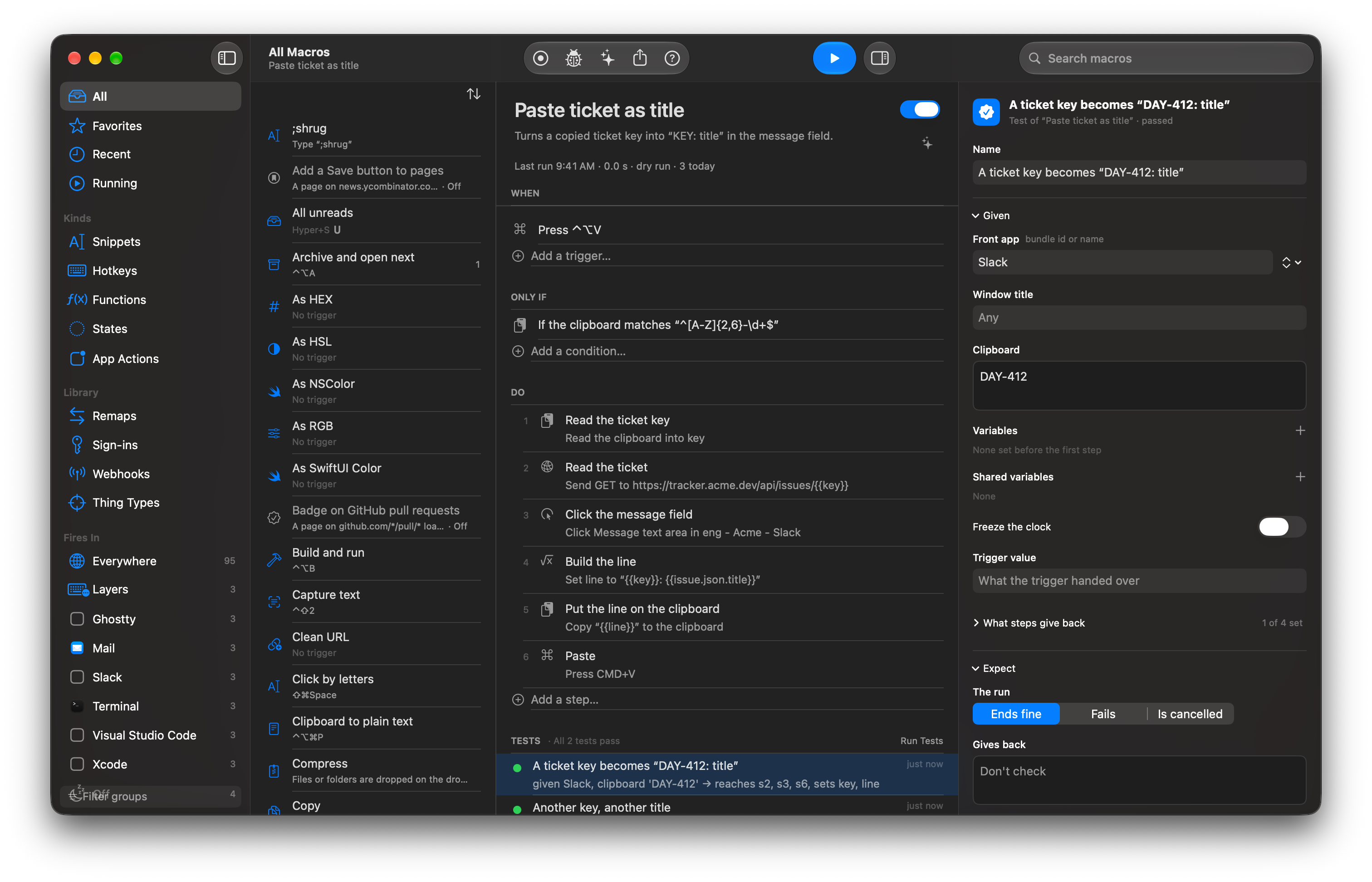
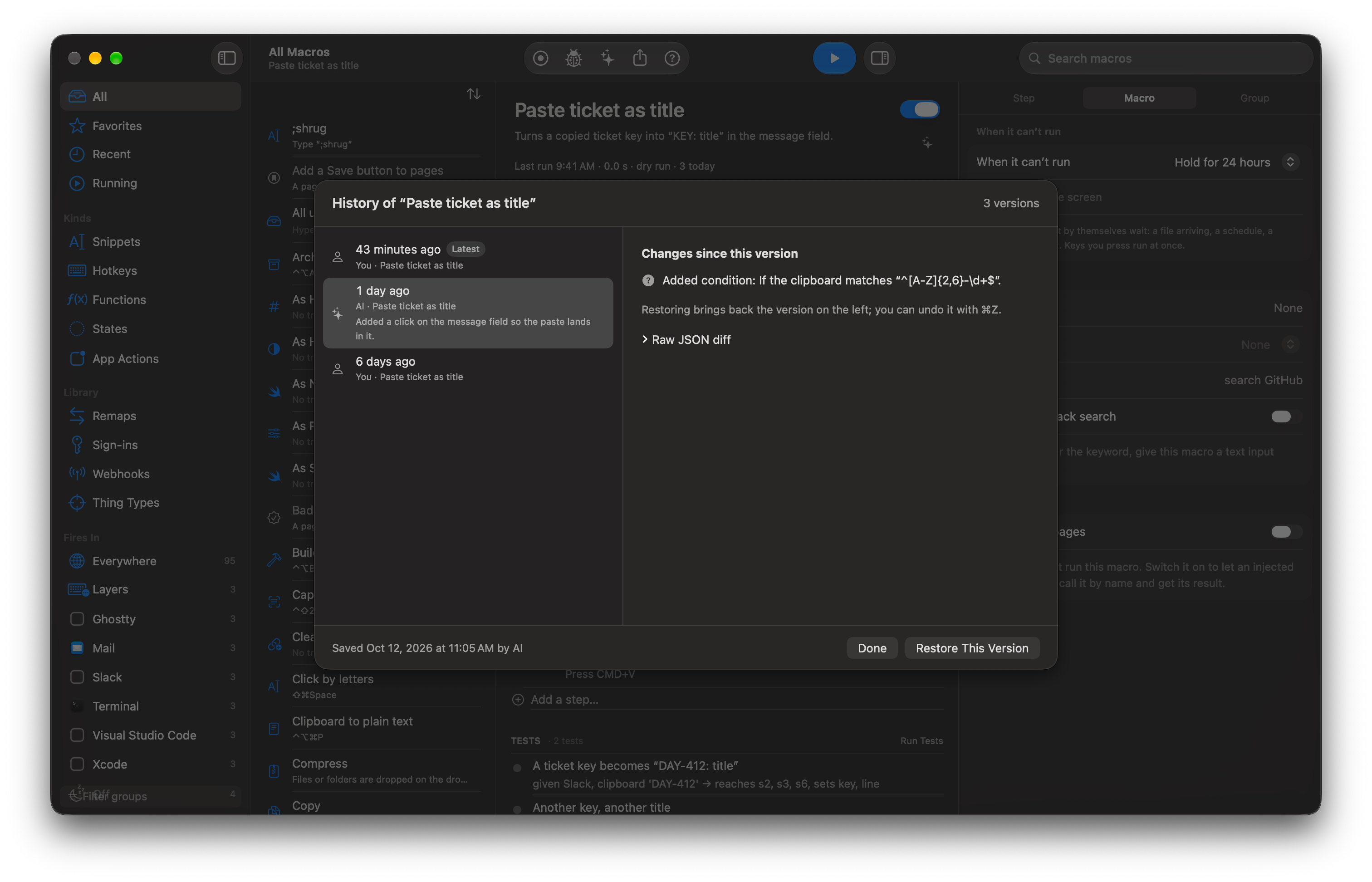
Every macro is a JSON file you can diff, keep in git or share by link. Every save is a version you can restore with ⌘Y. A test runs sealed from your Mac, and you can save one from a real run in one click. Checks look for the buttons again after a macOS update in case it moved them.

See how it works

A macro’s Tests section with “All 2 tests pass” after Run Tests
History for a macro with a diff between two versions and a Restore button

A web page is a trigger, a target and a table.

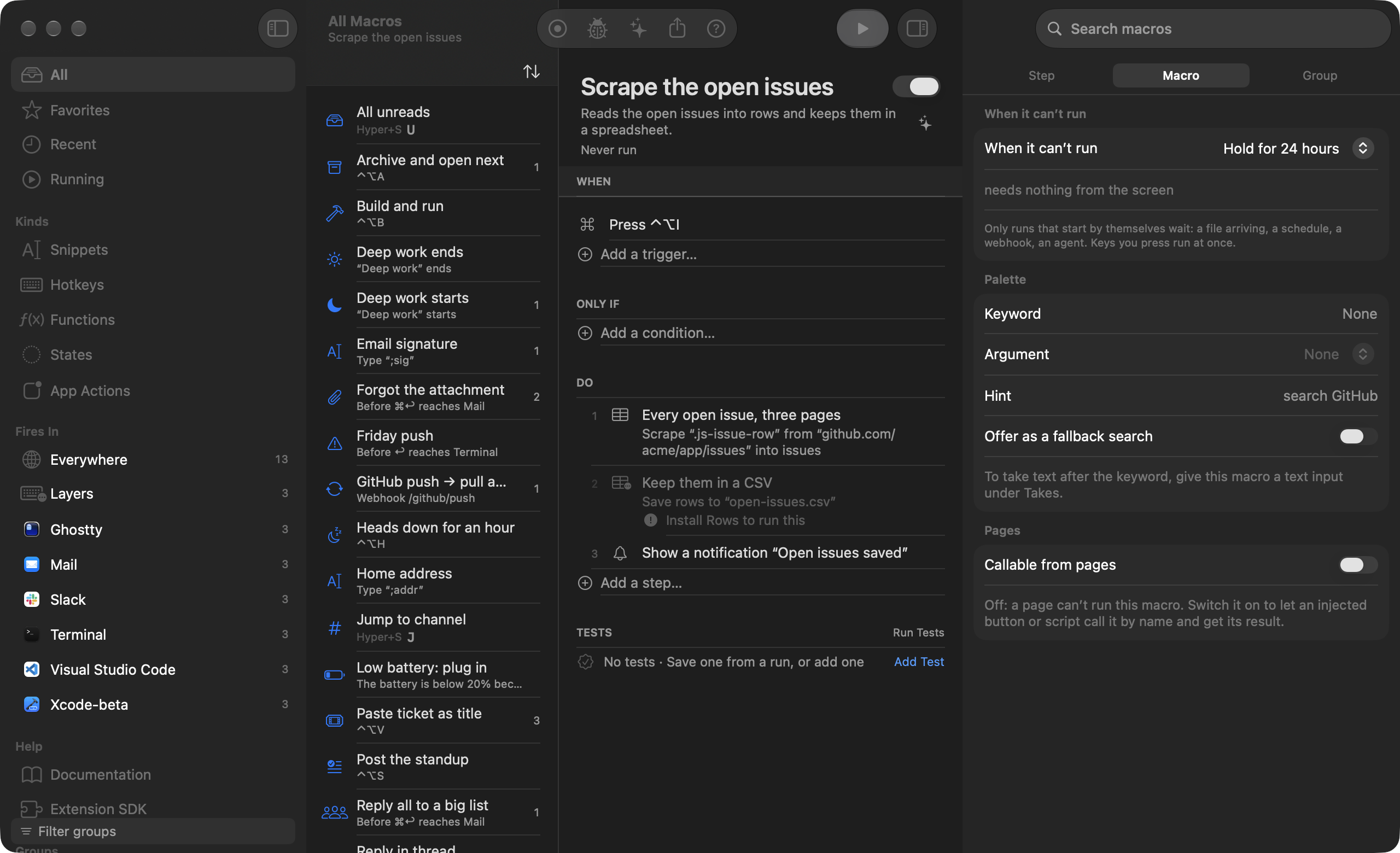
A small extension for Safari, Chrome, Arc, Brave, Edge and Vivaldi. A page loading, a form submitted or a download finishing can start a macro, and a button you put on a page can call one and get the result back. Click one result on a search page and the rest light up: Rows in Browser turns the list into a table with real prices and dates, saved as CSV or pasted into Numbers. Right-click a page and choose Watch this for changes, and it checks on a schedule with no tab open. CSS you inject is applied before the page draws, even with Switchboard quit. It solves no CAPTCHA and rotates no proxies, and Chrome takes the extension unpacked until it’s on the Web Store.

See how it works

The editor with a Scrape page step selected: its CSS selector, the column names and a preview of the rows it found

A scrape step with its columns in the inspector

Site Kits: features inside a website you don’t own.

A kit is a group of macros scoped to one site, with a folder of real files beside them. GitHub gets a button beside Merge that merges and closes the Linear issue, a CI badge read from the site’s own JSON as it loads, a sidebar of private notes, and a palette on ⌥⌘K inside the page. Anchors name the parts of the page the kit attaches to, each with fallbacks, so when GitHub ships a redesign, Activity says “2 of 9 anchors stopped matching” before you find out by clicking. Edit the CSS or JavaScript in your own editor and the open tab updates on save.

See how it works

App Kits: features around a Mac app you don’t own.

The same idea for a Mac app. Mail gets a “Make a to-do” button pinned beside the selected message, following the window and never taking focus. Slack’s “3 unread” on the Dock icon becomes a value you can use in a step, a condition or a trigger, or show in the menu bar. The kit can write Message > Archive: ⌘E into Mail’s real menus, and turning it off removes exactly what it added. Kits run inside Electron apps too, so Slack, VS Code and Notion take styles, features and commands when you open them through Switchboard.

See how it works

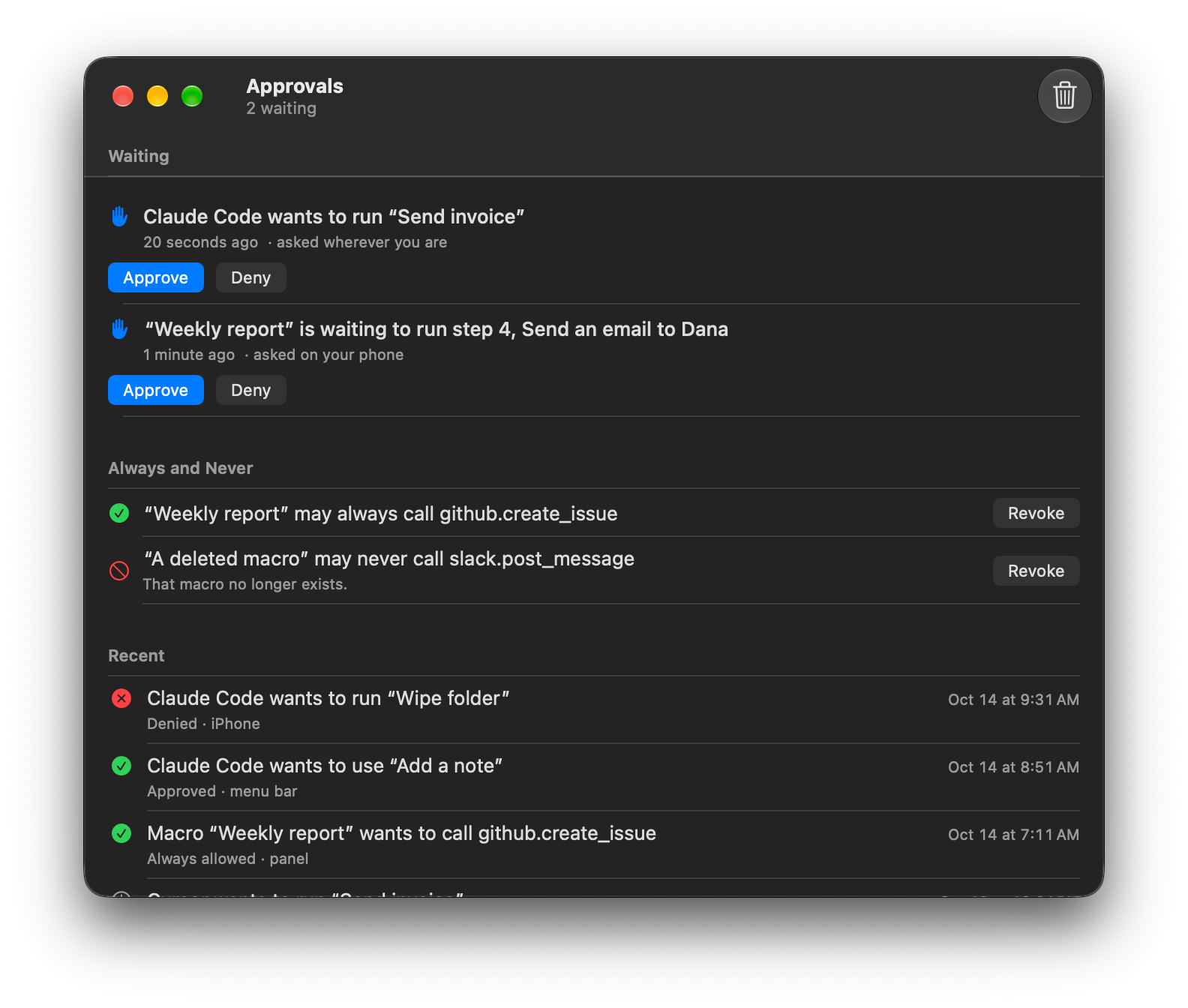
Agents run your macros, and wait for your yes.

The engine is an MCP server. Claude Code, Claude Desktop, Cursor or any other MCP client sees only the macros you expose, runs them and reads the traces. It can draft new ones, which arrive turned off. A step you marked destructive waits for Approve, on the Mac or your phone, whatever the agent asked for. All agents together are held to 60 runs a minute.

See how it works

The Approvals window with a pending agent run, the destructive step marked

run_macro("Paste ticket as title", key: "DAY-412") from Claude Code

Your iPhone and your other Mac are in it.

Tap a tile on the phone and the Mac runs the macro. An NFC tag, arriving home or the Watch button does the same. Macros on your Mac Studio show up in the palette as Run on Mac Studio rows, and the trace comes back to the Mac you’re on.

See how it works

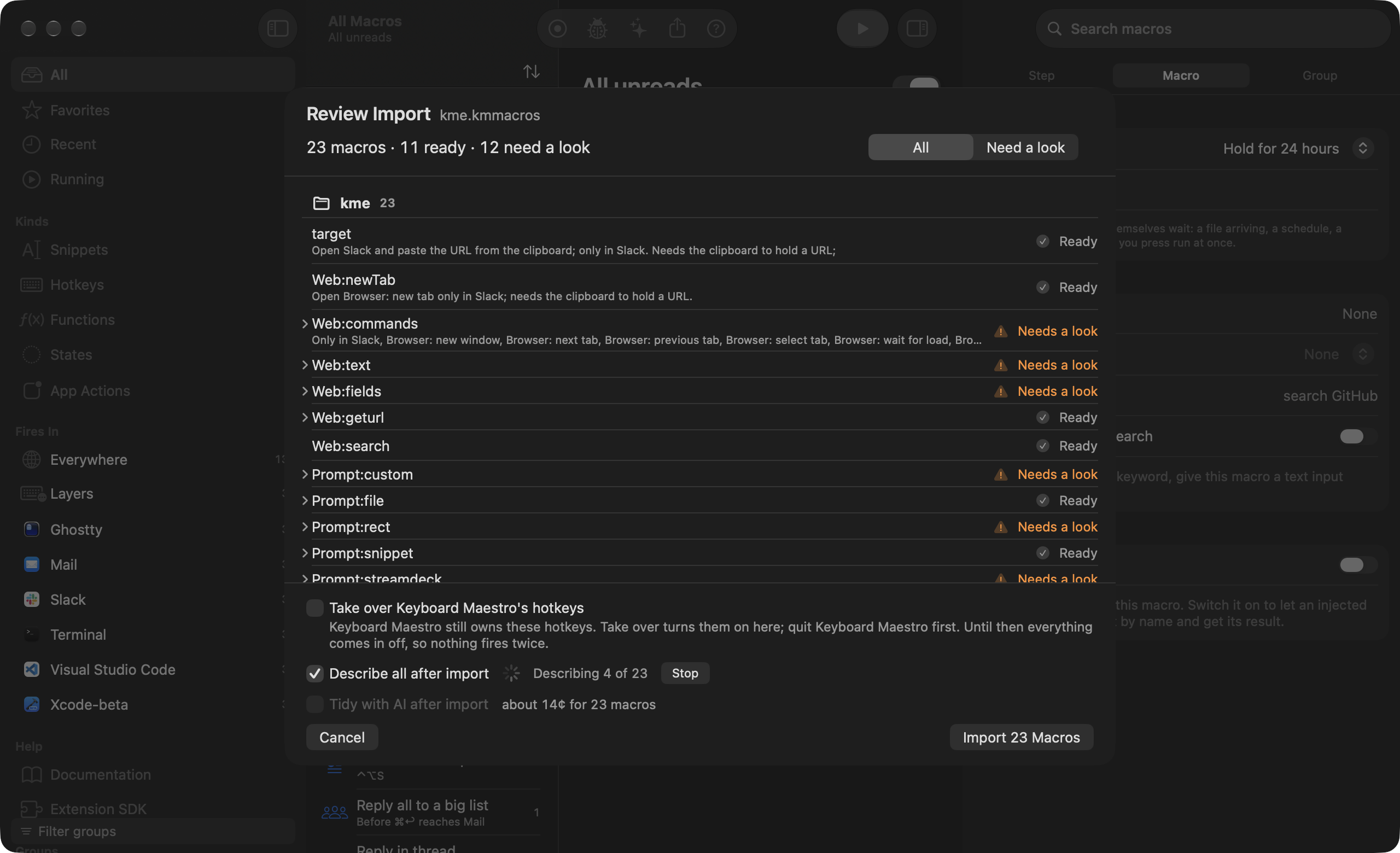
Bring your library

File › Import reads the library of 13 apps and shows a review of what comes across before anything is saved. Anything it does not convert is marked Not supported, with the reason. Groups arrive turned off, so the old app keeps its hotkeys until you turn each group on here, and nothing is deleted on the other side.

macOS text replacements come across too, and so does a Switchboard archive from another Mac.

  1. Choose File › Import…, or Bring your library in the Welcome window.
  2. Read the review. Each item is marked Ready, Needs a look or Not supported, with a note that says why.
  3. Turn groups on one at a time, or quit the old app and import with Take over so its hotkeys move across.
The Import Review sheet for a Keyboard Maestro file listing what comes across and what needs a look

Everything about imports · How it compares, with prices

Buy once or subscribe

Most people

Buy once

$59

one time, yours forever

  • Every feature, on up to 3 of your Macs
  • A year of updates included
  • Renew for $29 a year, whenever you like
Coming soon

Everything

$12/month

cancel any time

  • The app and every update while you subscribe
  • The AI allowance is included (Make with AI, Fix with AI, Make an extension), no API key needed
  • If you cancel, it runs to the end of the paid month
Coming soon

Founder

$99

one time, for life · 300 licences

  • Every future version, forever
  • Only the first 300 get it, and it closes after launch
Coming soon

If you buy once, you keep every version released before your year ends, forever; $29 adds another year of new ones when you want it. The AI plan is $8 a month on top of Buy once or Founder, and Everything already includes it. The trial is 30 days, needs no card or account, and comes back every six months. Refunds within 14 days, no questions asked. Your Mac checks the licence itself, offline.

Switchboard is made by one person, Kyle Carson. I built it because I was paying for seven utilities that overlapped and none of them could tell me why a hotkey didn’t fire.

Questions

Can I test my existing macros before paying?

Yes, that’s what the trial is for. It starts the first time you open the app and asks for no card or account. Import your Keyboard Maestro, BetterTouchTool, Alfred or other library on day one, turn groups on as you go, and use it for 30 days with every feature on. When it ends, nothing is charged.

What happens when the trial ends?

Macros stop running and your library stays exactly as it is, in plain text files. Buy once or subscribe and they start again. Nothing is deleted, and the trial comes back every six months on the same Mac if you want another look.

Do I need an account?

No. The trial starts on first launch with no sign-in and no code. The checkout asks for an email, for the receipt and the licence, and that is the only time one is asked for. Bought on the web? Install the app and click Open Switchboard in your receipt email.

Do I have to subscribe?

No. Buy once is $59 and yours for good, with a year of updates; renew for $29 when you want another year. Everything is $12 a month and includes the AI. I don’t charge for using your own Anthropic key, on either plan.

Why isn’t it in the Mac App Store?

The App Store sandbox takes away the event taps, the accessibility API and the shell, and that is most of what an automation app does, so I sell it directly. It is notarized by Apple and updates itself.

What leaves my Mac?

Nothing, unless you turn on sync (your own iCloud), the AI (your key or the relay), or share a macro by link. There is no telemetry. The privacy page lists every case.

Try it with your own library

Switchboard isn’t out yet. When it is, you’ll import what you have and run it with everything on for 30 days, with no card and no account. After that it’s $59 once or $12 a month.

Coming soon

Not out yet. When it is, the first 30 days are free with everything on, no card or account.